How to Ask Cursor Questions About Your Database (Without Copy-Pasting Query Results)
Stop copying SQL output into Cursor chat. Connect your database once and ask plain-English questions about real rows — schema-aware answers inside the editor, no export loop.
You're in Cursor, halfway through a feature. You need to know how many rows match a condition, whether a column is nullable everywhere, or what the staging database actually has in orders versus what your seed file assumes.
So you open a SQL client — or ask someone on Slack — run a query, copy the output, switch back to Cursor, paste it into chat, and hope the context window still has room for the rest of your task.
Then the follow-up question needs a different filter, and you do it again.
There's a better workflow: connect your database to Cursor once, and ask questions in plain English inside the editor. The AI reads your schema, runs read-only queries when it needs to, and answers from live rows — same conversation, no clipboard shuttle.
This post is for developers who want that outcome. If you want the click-by-click setup, skip to Connect Cursor to PostgreSQL. If you're not sure live database access is real or safe, start with Can AI Actually See Your Data?.
The copy-paste loop (and why devs tolerate it)
Most teams don't plan this workflow. It accumulates:
- You need a fact from the database to write code, debug a test, or review a PR.
- You run SQL somewhere else — psql, TablePlus, the Supabase dashboard, a coworker's Metabase link.
- You copy rows or counts into Cursor chat.
- Cursor reasons from the paste.
- The next question needs fresh data, so you repeat steps 2–3.
It holds up until the paste goes stale by the time you ship, the wrong environment gets queried, a wide SELECT * dumps ten thousand rows into chat and blows the context, or someone pastes production data into a thread that gets logged somewhere you didn't intend.
You're already fine at SQL — the fix is stopping the round trip between the database and the tool you're already coding in.
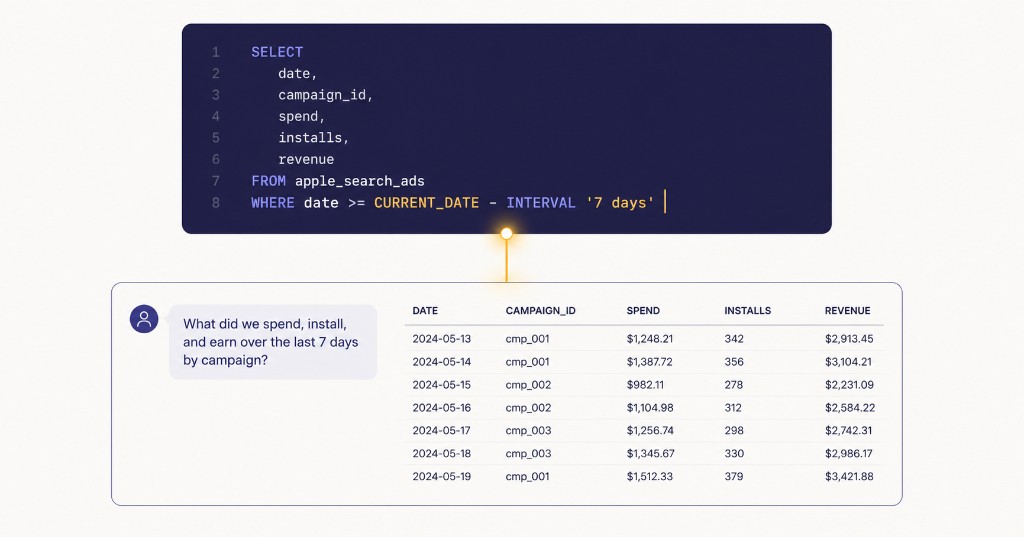
What changes when Cursor can query your database
Once a live connection exists, the questions you ask in Cursor stop being hypothetical.
Examples that are painful with copy-paste but natural with a connector:
- "How many users signed up in the last 7 days with
plan = trial? Write the query you used so I can save it." - "This migration adds a NOT NULL column — are there any existing rows that would break it?"
- "The test expects three orgs in seed data. Compare what's actually in staging — what's different?"
- "Find orders where
amount_centsis negative and show me customer email — I want to understand if it's a bug or refunds."
The model inspects the schema through Cursor's MCP connection, runs the query, reads the result, and continues the task in the same thread with current data while you stay in the editor.
You're giving it read access on demand, not handing over the keys.
Who this is for
Good fit:
- Full-stack and backend devs who live in Cursor and hit the database daily
- Solo founders shipping product who don't want a separate BI stack for ad-hoc checks
- Teams where "can someone run a query on staging?" is a recurring Slack interrupt
- Anyone who's pasted query output into chat more than twice this week
Not a replacement for:
- Your migration workflow and schema review process
- Production incident response that needs EXPLAIN plans and DBA tooling
- Compliance reporting with signed-off metric definitions
Think of it as self-serve data inside the IDE for the questions that currently break your flow.
Three ways devs handle this today
1. Copy-paste (default)
Run SQL elsewhere. Paste into Cursor.
Works when: One quick count, you trust the environment, the result fits in chat.
Breaks when: Follow-ups, wide results, or you need the AI to compare multiple tables.
2. Hard-code context in the repo
Seed files, fixture JSON, schema dumps in /docs.
Works when: Tests and local dev.
Breaks when: Staging drifts, or the question is about production-like volume you didn't snapshot.
3. Live connection via MCP
Cursor talks to your database through a connector — discovers tools, runs read-only queries, returns structured results.
Works when: You want answers grounded in what's actually there, inside the same session where you're writing code.
Tradeoff: Someone has to set up the connector once and pick sensible access (staging, read-only, table limits).
Option 3 is what this post is about. The setup guide is Connect Cursor to PostgreSQL, Connect Cursor to Neon, Connect Cursor to MySQL, Connect Cursor to SQL Server, or Connect Cursor to Supabase depending on your stack.
Setup in one sentence
Save your database credentials in a managed connector, copy the MCP endpoint URL, add it to Cursor's MCP config (~/.cursor/mcp.json or a project-level .cursor/mcp.json), enable the connector in chat settings — then ask a question you already know the answer to and verify the number matches.
Most teams are running queries within an hour if staging credentials are handy. You don't need to understand the protocol underneath; if you're curious, How MCP Actually Works goes there.
Staying safe (without skipping it)
Connecting an IDE to a database sounds risky until you compare it to pasting production CSVs into chat with no audit trail.
Sensible defaults:
- Start on staging or a read replica, not production primary, until you're comfortable.
- Use read-only access so nothing the model generates can mutate data.
- Don't commit the connector URL to git — treat it like a password.
- Check query logs if an answer looks wrong; you can see exactly what ran.
More myth-busting on safety and cost: Can AI Actually See Your Data?. For the full staging → replica checklist, see Staging First.
"But my team uses ChatGPT / Claude for questions, not Cursor"
- Ask ChatGPT about your database — for PMs and ops who live in ChatGPT, not the IDE.
- Ask Claude about your database — plain English to SQL, no export loop.
- Connect Claude to PostgreSQL — same live-query idea in Claude Desktop.
Frequently asked questions
Do I need to install a local MCP server? No — paste a managed connector URL into Cursor's MCP config and you're done. Self-hosting is optional if you want everything running on your laptop.
Does this work in Composer and Agent mode? Yes. Once the connector is enabled, chat, Composer, and agent flows all call the same database tools — inspect schema, run queries, use the results in whatever they're building.
Can Cursor delete or change my data? That depends on how the connector is configured; read-only is not a property of MCP itself. On Synra, destructive SQL is blocked at the gateway before it reaches your database, even if the model generates an INSERT or DROP. If you self-host a connector or wire one up directly with write-capable credentials, nothing in MCP stops that — you're responsible for that layer yourself.
Will Cursor see my entire database? Cursor can see whatever the connector exposes — typically the schema and tables your connection credentials can reach. On Synra, access is scoped to the database user you provide and defaults to read-only; you can also restrict which tables appear per connection. Start on staging until you've verified a few known answers, even with read-only access.
Can I use the same connector URL in ChatGPT? Often yes, if each client supports custom MCP connectors — one managed endpoint can work across Cursor, ChatGPT, and Claude without setting up three separate bridges.
Once Cursor and your database share the same conversation, most ad-hoc data questions stop needing a separate window — set it up once and use it every day you're shipping.
If you're a founder or ops lead (not the one writing code), talk to your database without waiting on an analyst covers the same shift from the business side.
Start a free trial at mcpserver.design, then follow Connect Cursor to PostgreSQL when you're ready to wire it up.
Related reading:
- Connect Cursor to PostgreSQL — full setup steps
- Connect Cursor to Neon — Neon branches, cold starts, pooled vs direct
- Connect Cursor to MySQL — same Cursor setup for MySQL / MariaDB / PlanetScale
- Connect Cursor to SQL Server — same Cursor setup for Azure SQL / MSSQL
- Connect Cursor to Supabase — same Cursor setup for Supabase projects
- Check a Migration Against Your Database With AI — preflight NOT NULL / FKs on staging
- Find Missing Indexes With AI — index inventory on staging
- Explore an Unfamiliar Database With AI — schema tour prompts
- Why AI Hallucinates Your Database Schema — why paste-and-prompt invents your tables
- Staging First: AI Database Access Without Production — connect staging before prod
- Ask ChatGPT About Your Database — same outcome, different client
- Can AI Actually See Your Data? — what's real, what's hype, cost & safety
- MCP Troubleshooting — if Cursor can't see the tools
- Self-Hosted vs Managed MCP Server — build vs buy